![trace-logo-full-colour-rgb-1878px@72ppi.png]](https://trace.weareisla.co.uk/hs-fs/hubfs/trace-logo-full-colour-rgb-1878px@72ppi.png?height=50&name=trace-logo-full-colour-rgb-1878px@72ppi.png)
- Find the invitation to the TRACE platform in your email inbox or junk/spam folder.

- Click 'Accept Invitation' and follow the login instructions.
- Once logged in, click the 'Event Management' tab in the top right corner and select the relevant event.
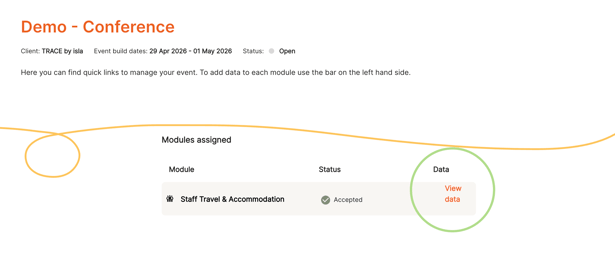
- you'll see the relevant measurement categories you've been asked to input data for. Click 'View Data' to go straight to the relevant page.
- From this page, click 'Edit Data' to start inputting data. You can either;
- Input data directly into the platform if you already have it to hand, or:
- Click 'Get Template' to download TRACE Templates. These templates are especially useful if you are still in the early stages of measurement or if you anticipate a large volume of data.
You can collect data in the templates through the planning stage, then copy and paste the data directly into the platform when ready.
TRACE templates are available in Excel or Google Sheet formats.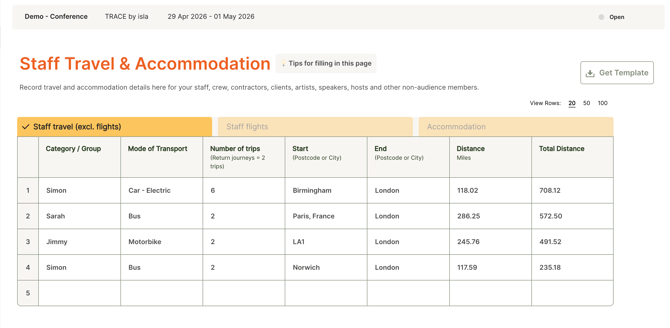
- Once data is filled out, click ‘Ready for Review’. The event owner will then be able to review and accept the data into their event, with no further action on your end.
Need to make changes? Simply reopen the module by clicking 'Reopen' in the top-right corner, make your edits, and then mark it as 'Ready for Review' once more.