![trace-logo-full-colour-rgb-1878px@72ppi.png]](https://trace.weareisla.co.uk/hs-fs/hubfs/trace-logo-full-colour-rgb-1878px@72ppi.png?height=50&name=trace-logo-full-colour-rgb-1878px@72ppi.png)
How to link activities to events
1. Input your activity into Business Operations. This feature works for Staff Travel, Accommodation, Business Travel (including or excluding Flights), Transport, and Energy (via Placeholders).
2. In the 'Included in Event' column, search and click the event you'd like to link the activity to, as shown below. This will include:
- Events you have created in the Event Management page
- Events you have been invited to as a supplier
- Placeholder Events you've created in the Business Operations feature (More information below).
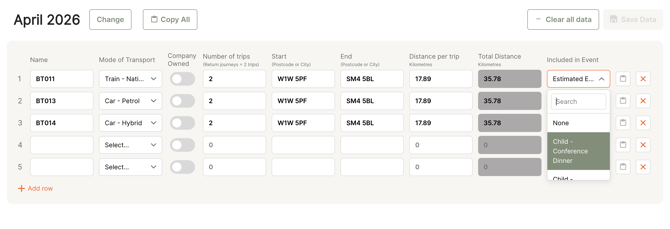
This activity will now show up in the linked event, in the relevant module.
Note; The emissions for a linked activity will be shown in the dashboard for the event not your Business Operations dashboard (unless it's a placeholder).
Linking activities to Placeholders
You are also able to link activities to 'Placeholder' events.
This can be useful to separate data if the event has not yet been created in TRACE (either by your own company or a company you are supplying data for).
If you link activities to a Placeholder event, the emissions will remain in your Business Operations dashboard until that Placeholder is linked to an active event.
More information on Placeholders is available here.